
PickWin Casino App Canada
There is no app store listing to hunt down. Our mobile setup runs directly in your browser, giving Canadian players instant access to the full platform from any smartphone or tablet. This page explains exactly how the PickWin app works, how to pin it to your home screen, what the game library looks like on a touchscreen, and how your deposits and data stay protected every step of the way.
What the Browser App Actually Is
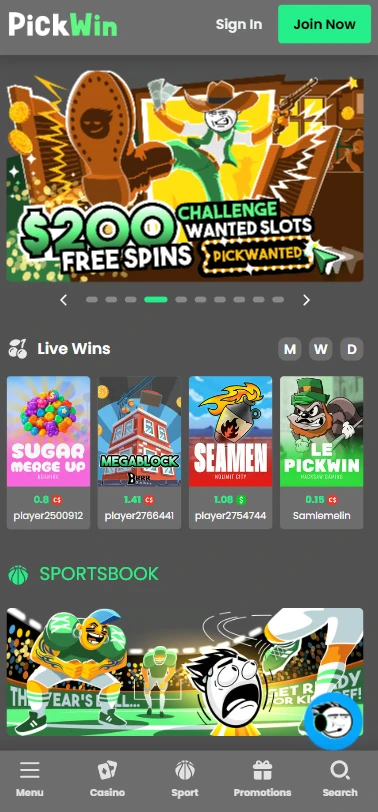
Our platform runs on a Progressive Web App model — meaning the PickWin Casino mobile app lives inside your mobile browser rather than inside any official app store. There is no file to download, no storage space consumed, and no approval process from Apple or Google standing between you and your account. The technology is identical to what powers many modern banking and productivity tools: a mobile-optimized site that behaves like a native app, with fast load times and touch-friendly navigation.
| Platform | Status |
|---|---|
| App Store (Apple) | Not listed |
| Google Play Store | Not listed |
| PWA (Browser-based) | Fully supported |
| Android browser access | Fully supported |
| iOS browser access | Fully supported |
If you want to explore the full range of Pickwin platform options before committing to anything, the main site loads on any modern mobile browser without adjustment. No version mismatches, no update prompts blocking your session — just the live lobby, ready to go.
How to Add the App to Your Screen
Setting up the PickWin app Canada download experience takes under a minute on both Android and iOS. The first step is simply opening our site in your preferred mobile browser. From there, your device does the heavy lifting.
- Open Chrome (Android) or Safari (iOS) and navigate to our site
- Tap the menu icon (Chrome) or the Share icon (Safari)
- Select “Add to Home Screen”
- Confirm the shortcut name and tap Add
Once you do that, a branded icon appears on your home screen and behaves exactly like an installed app — full-screen launch, no browser toolbar eating into your display. Players who want to understand more about how accounts, bonuses, and navigation work can check the helpful Pickwin FAQ guide before they even make a deposit. For those wondering about the download PickWin Casino app for android process specifically: Chrome on Android handles the “Add to Home Screen” flow cleanly, and no APK file is ever required.
The Game Experience on Mobile
Every one of our 14,520 titles runs smoothly on touchscreen devices — slots, live dealer tables, crash games, and sportsbook markets all load without a dedicated native app in sight. That number is worth sitting with for a second. Nearly 12,000 slots from over 110 providers, including Pragmatic Play, NoLimit City, Hacksaw Gaming, and our in-house Brrr Games studio, all scale cleanly to any screen width. Titles like Gates of Olympus 1000, Sweet Bonanza, Big Bass Bonanza, and the Brrr originals Crash and Mines are built for fast mobile sessions by design.
Our 1,486 live dealer titles stream reliably over a standard mobile connection, with studios from Evolution, Pragmatic Play Live, Vivo Gaming, and TvBet all rendering at broadcast quality on a phone screen. The live lobby is touch-navigable — swipe between table categories, tap a seat, and you are in. If you want to check which promotions line up best with mobile play before you start spinning, the top Pickwin promo guide has you covered. Our average library RTP sits at 96.68%, and that figure applies whether you are playing on a desktop or a handset.
Funding Your Account from Your Phone
Managing deposits from a phone is genuinely straightforward here. We support 19 payment methods — one fiat option and 18 crypto routes — all of which are fully accessible through a mobile browser session.
- Interac — minimum $20, instant, zero fees; ideal for Canadian players who prefer familiar banking
- BTC and ETH — minimum $18 each; authorize directly from your mobile crypto wallet app
- USDT (TRC-20) — minimum $18; fast network confirmation, very low external fees
- Wallet app authorization — most crypto wallets (Trust Wallet, MetaMask mobile) handle outgoing transactions natively, so you never need to copy-paste an address manually
- Withdrawal processing — all payouts cleared within 6 hours, no fees charged on our end
Interac withdrawals require a minimum of $20 and process within one to two business days once our internal review is done. Crypto payouts clear faster — USDT on TRC-20 is the quickest route for regular cash-outs. Every transaction, fiat or crypto, is entirely free from our side.
What You Gain by Installing
The no-storage advantage of our PWA model is real, though it does come with one honest trade-off worth knowing upfront. Mobile data or Wi-Fi is required for every session — there is no offline mode.
| Feature | PWA Detail |
|---|---|
| Storage used on device | 0 MB (browser cache only) |
| Offline play | Not supported |
| Auto-updates | Automatic — always current version |
| iOS compatibility | Safari, full support |
| Android compatibility | Chrome, full support |
| Installation fee | Free |
Beyond storage, the practical gains are real: no version lag, no waiting for an update to push through an app store, and no risk of your session being interrupted by a mandatory upgrade prompt mid-spin. The PickWin app simply loads your account in whatever state you left it.
Keeping Your Data Protected on the Go
Our mobile experience carries the same SSL encryption layer that protects desktop sessions — your financial data and personal details are encrypted in transit whether you are on a home network or a mobile connection. That is non-negotiable for us. The PickWin Casino mobile app experience does not compromise on security just because there is no native binary involved.
- Mobile SSL encryption — active on every page load, including login and cashier screens
- Biometric browser logins — Android and iOS both support fingerprint or Face ID authentication through Chrome and Safari respectively, reducing the need to type passwords mid-session
- Telegram support — our 24/7 support channel is fully accessible from a phone; reach us directly through the app without switching devices
KYC verification — triggered at your first cash-out or for larger amounts — can also be completed by photographing your documents directly through your phone camera. A government-issued ID with no glare and fully visible edges, plus a utility bill under three months old, covers the standard requirements.
Who Is the PickWin App For
Honestly? It suits Canadian players who want their full casino and sportsbook in one tap without managing app updates or worrying about storage space. If you regularly switch between live blackjack, slots like The Dog House Megaways 1000, and hockey betting markets, the mobile browser setup handles all three without friction. Crypto users will especially appreciate being able to authorize deposits from a wallet app and receive payouts within six hours. The PickWin app Canada download process is a one-minute home screen shortcut, not a commitment — and the VIP program, bonuses, and all 14,520 titles are available from the moment you open it.
Frequently Asked Questions
Does the PickWin Casino app cost money?
No — accessing our platform through a mobile browser and pinning it to your home screen costs nothing. There are no subscription fees, no installation charges, and no in-app purchases required to play. Your only financial commitment is whatever you choose to deposit before a real-money session.
How long do crypto withdrawals take at PickWin?
We process all withdrawals within six hours internally. Network confirmation time on top of that depends on the coin you choose — USDT via TRC-20 typically confirms in under ten minutes, while BTC may need twenty to sixty minutes depending on network congestion. We charge zero fees on our end for every crypto payout.
Where do I enter a PickWin Casino promo code?
Promo codes are entered during the registration flow or in the cashier section when making a deposit. During sign-up there is an optional referral or bonus code field — that is where codes like PICKLIVE for the welcome bonus or the Wanted Slots codes go. If you miss it during registration, reach us through Telegram and we will sort it out.
Why is my PickWin Casino withdrawal delayed?
The most common reason is a pending KYC check — specifically if it is your first cash-out or a larger-than-usual withdrawal amount. Submitting a clear government ID photo and a recent utility bill through our support channels resolves this quickly. Internal processing is completed within six hours once documents are approved.
Can I set deposit limits at PickWin Casino?
Our responsible gambling tools, including self-exclusion options, are available by contacting our support team directly via email or Telegram. We reference GamCare, Gamblers Anonymous, and Gambling Therapy on our responsible gambling page. Reach out and we will apply any account restrictions you need promptly.